Don't pay or wait more than you need to for your Nissan Cabstar radio code. We generate most Nissan codes instantly, so whether you
listen to Heart FM or your own tunes – we'll get you back into your radio or navigation in minutes.
Only £4.99
The highest rated Nissan radio code generator
The cheapest instant radio codes in the world
Instantly generated on-screen and sent to your email
Pay with Apple Pay, Google Pay, card, PayPal and more
When your Nissan Cabstar's radio, stereo or sat nav becomes disconnected from the battery, usually due to a garage service or a low battery, it automatically locks and begins to ask for a radio unlock code. As this is an anti-theft feature it's not possible to unlock a Nissan Cabstar radio without this code, but finding your radio code is an easy process that can be done in minutes. Many dealerships and online generators decode the radio code from the VIN number, but this code will be incorrect if the radio has ever been changed in the vehicle's lifetime.
The most accurate way to get your Nissan Cabstar's radio code (also known as the authentication key or security code) is by decoding it from the radio's serial number. There are two ways to find this serial number - a fast one and a slightly slower one.
Careful
Because we incur costs and fees for every code we generate, our Refund Policy does not usually cover codes decoded from incorrect serial numbers. For this reason you should always double-check that the serial number you enter into our decoder has the same letters and numbers as the serial number on your radio (don't worry about spaces). We will always make exceptions in obviously confusing situations, such as when a Q looks like an O or an I looks like an L.
Method 1: the rapid way
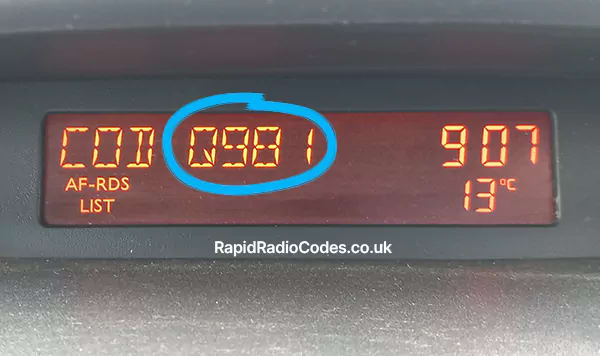
If your Nissan Cabstar radio or stereo has number preset buttons, you may be able to reveal the serial number on the display without removing it. While the radio is asking for a code, hold buttons 1 and 6 for at least 5 seconds and then release them. If nothing changes on the display, try the same with buttons 2 and 6.
If this method worked the display will show your radio's serial number, also known as the precode. This will always be 1 letter followed by 3 numbers – in the example image below it is Q981.
Once you have your serial number, simply enter it into our Nissan Cabstar radio code decoder at the top of this page to generate your code instantly.
If this method doesn't show a serial number that looks like A123, or your radio/navigation doesn't have any number buttons, you'll need to use method 2.
Method 2: removing your Nissan Cabstar radio
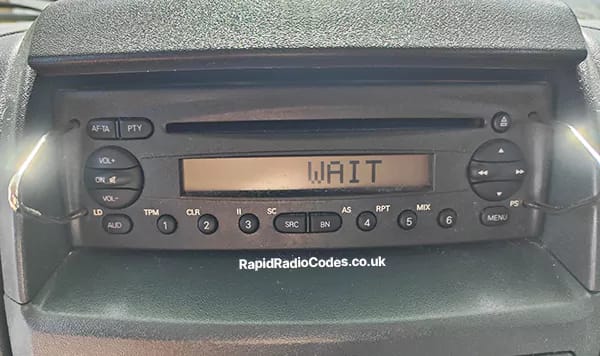
Don't worry – removing your radio is not as hard as it sounds, and for most Nissan Cabstar models you won't even need to disconnect any wires. Simply slide out the radio from the dash and take a picture of the label at the top or side of the radio. The exact process for removing your radio depends on whether your radio has removal slots or not. Look carefully around the front of your radio for 2 or 4 round holes.
If the slots are spaced wider apart, you will need these double-din release keys. If you're in a rush you can also try using everyday items that will fit into the radio removal slots, like thin screwdrivers or barbeque skewers, bearing in mind you'll need one for each slot.
Once you have your radio removal tools, insert them into the slots, pushing until you feel some resistance or hear a click. Finally, start pulling your radio out while pushing out on the removal tools - this will give them enough grip to pull out the radio. In most cases you won't need to disconnect any wires - simply take pictures of all the labels on the radio and click it back into the dash.
If you'd prefer to see this process visually, see this video.
If your Nissan Cabstar radio doesn't have any visible removal slots, the exact removal process depends on your radio's model. To find the easiest and most specific instructions for removing your radio, search YouTube with your vehicle's model and model year: for example, how to remove a 2009 Nissan Cabstar radio. For most Nissan models, the only tools you will need are a standard Philips screwdriver and a pry tool, and you won't need to disconnect any wires - simply take pictures of all the labels on the radio and click it back into the dash.
Identifying your Nissan Cabstar serial number
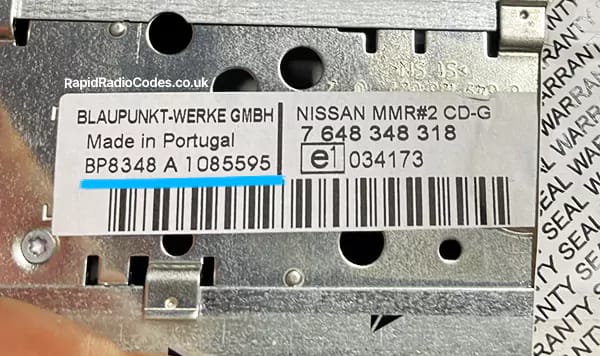
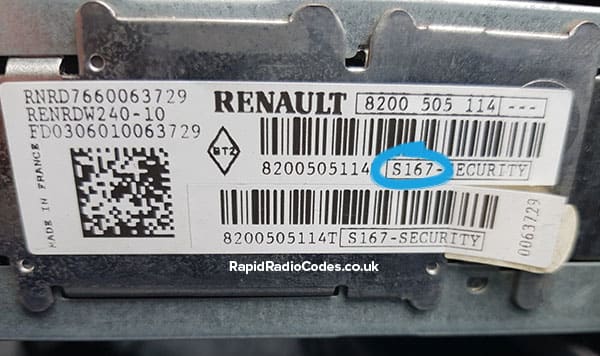
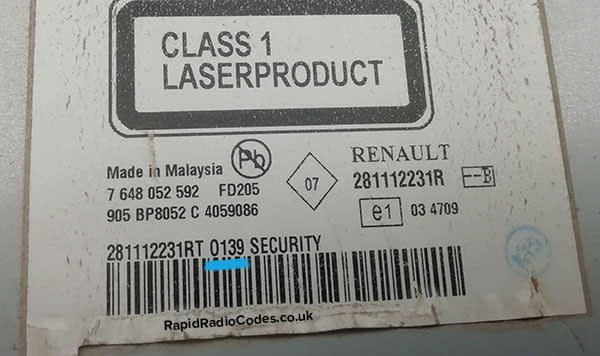
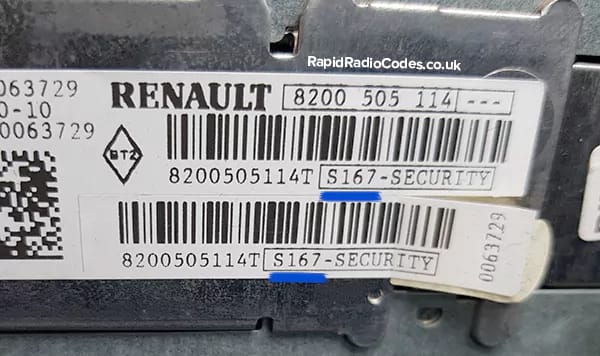
Once you've partially removed your radio from the dash, take pictures of any labels you can see and compare with the image examples below to identify your radio's serial number. If you can't find a matching serial number on the radio's labels, it may also be engraved into the radio itself.
Our instant Nissan Cabstar radio decoder currently supports the following serial numbers:
2811XXXXXXXA123 (starts with 2811)
8200XXXXXXXA123 (starts with 8200)
77XXXXXXXXXA123 (starts with 77)
A123 (4-digit precode)
Image 1Image 2
If your serial number starts with 2811, 8200 or 77 you don't need to enter the full serial number - just the last 4 characters. This will always be 1 letter followed by 3 numbers (e.g. A123).
Since we have one of the largest databases of Nissan serial numbers and radio codes in the industry, we also have one of the highest decoding success rates and are able to decode many Nissan Cabstar radios that others aren't, and usually at a cheaper price. Note that newer Nissan models with NissanConnect, Connect 2, Connect 3 or other Bosch-built infotainment units do not prompt for a serial-derived code and aren't decodable from the serial number alone. Some of the Nissan radios that we can generate instant codes for include:
Renault Media Nav
Renault Media Nav Evolution
Renault Navi 80 IntelliLink
Renault R-Link
and much more...
Unfortunately, it's not possible to unlock a Nissan radio asking for a security code without entering the code. This is intentional as these codes were originally designed as an anti-theft feature to make it harder for thieves to steal and resell car radios.
Due to the costs of running a small business providing radio codes around the world 24/7, it's not possible to sustainably offer Nissan radio codes for free. There are many decoding services out there that attract customers with the word "free" only to reveal a price at the very last second or fail to deliver a code at all (as shown by their TrustPilot reviews). Our prices will always be shown up-front, and our radio codes are already priced as low as possible while allowing us to stay profitable, provide reliable UK-based support and continue adding more models and manufacturers.
Not only were we the first radio decoding company to offer radio codes for all manufacturers at one fixed price, we were also one of the first to charge as low as £4.99 - before we came along virtually no decoding company offered radio codes at such an affordable price, and to this day we still beat 95% of our competitors on price, without making you wait around for your code.
Unfortunately it's not possible to generate a Nissan radio code from the registration plate at all. Although most dealerships and some online decoding sites do use the VIN to decode the radio code, this is not reliable due to being tied to the car rather than the radio. This means that if your radio was changed since it was first manufactured, a radio code decoded from the VIN will be incorrect. For this reason we decode the code from the radio's serial number for the best chance of unlocking your radio.
All our Cabstar radio codes are decoded instantly, displayed on the screen immediately after payment and sent to your email at the same time. To ensure that your code and receipt are sent to you, double-check that the email you enter when paying for your radio code is correct. If it's been more than 2 minutes since you purchased your code and you haven't received your email, get in touch with us so we can look into why this might be. In most cases this is down to a misspelt email address.
This means an incorrect radio code has been entered 10 different times. To bypass this lock leave the ignition and radio on for between 30 minutes to an hour - this should return you to the CODE or CODE IN screen and allow you to enter another code.
So you've located your serial number, entered it into our radio code generator, and received your decoded radio code in return. Congratulations! Now comes the best part: using your new radio code to unlock your Cabstar radio.
This process varies depending on your vehicle's radio. Each of our Nissan radio codes come with simple instructions to enter your new code at no extra cost. To receive your entry instructions, double-check that your email address is spelt correctly at the payment stage. If it's been more than 2 minutes since you purchased your unlock code and you haven't received your email or receipt, get in touch with us so we can look into why this might be. This is usually down to a misspelt email address.
Who we are
RapidRadioCodes™ is a small independent business based out of Sheffield, Yorkshire, in the North of the UK. Our mission is to build the biggest database of radio code algorithms and codes in the world, enabling us to instantly generate radio unlock codes for all cars, vans and trucks, at a price that is more affordable than both the dealerships and other third-party decoding sites. Since being established in 2023, we've already helped over 19,000 drivers, garages and car dealerships unlock their radios, and become the highest-rated radio decoding site on both TrustPilot and Reviews.io.
Still have questions? See if we've already answered them in our main FAQ section.